OpenClaw MCP security covers the vulnerabilities in OpenClaw's Model Context Protocol layer that allow tool poisoning, supply chain attacks, WebSocket hijacking, rug pulls, and credential theft. With 42,000+ exposed instances and 1,184 malicious ClawHub skills discovered in early 2026, securing MCP connections is critical. This guide documents 5 real attacks with their specific configuration fixes.
OpenClaw crossed 100,000 GitHub stars within weeks of launching. In that same window, security researchers disclosed 8 critical CVEs, found 42,000+ instances exposed to the public internet, and discovered 1,184 malicious skills sitting on ClawHub.
That's the trade-off nobody warned you about. OpenClaw is genuinely useful -- it connects your AI agent to WhatsApp, Telegram, email, calendars, your filesystem, and a growing ecosystem of MCP servers. But every one of those connections is an attack surface, and the defaults ship wide open.
This post covers 5 real attacks that target OpenClaw's MCP layer. For each one, I'll explain how it works and give you the specific configuration change that blocks it. No abstract security advice -- just the fixes.
The good news: every attack below is preventable with a config change. The bad news: the defaults protect you from none of them.
TL;DR: Five attacks, five fixes. (1) Tool poisoning -- vet every skill description + run
openclaw security audit --deep. (2) ClawHavoc supply chain -- enable sandbox mode "all" + check VirusTotal before installing. (3) ClawJacked WebSocket hijack -- update to v2026.2.26+, bind gateway to 127.0.0.1. (4) Rug pulls -- pin skill versions, disable auto-updates. (5) Credential theft -- chmod 600 your .env, use environment variable references.
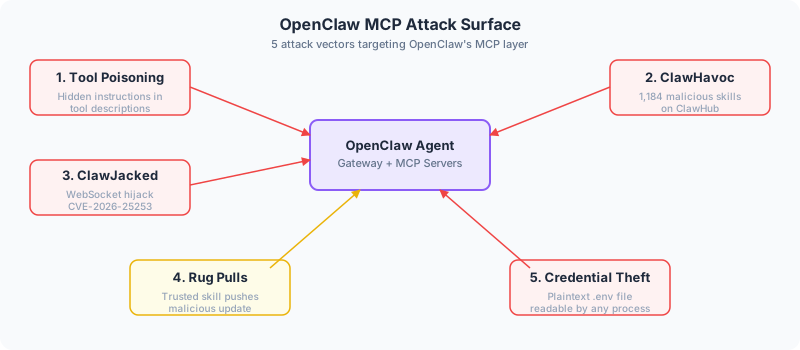
5 OpenClaw MCP Attacks at a Glance
| Attack | Risk Level | Exploit Method | Fix |
|---|---|---|---|
| Tool Poisoning | High | Hidden instructions in skill tool descriptions enter the LLM context window and manipulate agent behavior | Vet all skill descriptions; run openclaw security audit --deep; set tool allowlists in openclaw.yaml |
| ClawHavoc (Supply Chain) | Critical | 1,184 malicious ClawHub skills delivering infostealers, reverse shells, and config exfiltration | Enable sandbox mode all; check VirusTotal before installing; pin skill versions |
| ClawJacked (WebSocket Hijack) | Critical (CVSS 8.8) | Malicious website brute-forces local gateway password via cross-origin WebSocket with no rate limiting | Update to v2026.2.26+; use strong random gateway password; bind gateway to 127.0.0.1 |
| Rug Pulls (Skill Updates) | High | Trusted skill pushes malicious update; auto-updates apply it silently without re-approval | Pin skill versions; disable auto-updates; review diffs before accepting updates |
| Credential Theft | Critical | Plaintext credentials in ~/.clawdbot/.env readable by any process or malicious skill |
chmod 600 the .env file; use environment variable references; enable sandbox mode all |
Why OpenClaw's MCP layer is an attack magnet
How OpenClaw handles MCP servers
OpenClaw declares MCP servers in its openclaw.yaml config file. It spawns each server as a child process and routes tool calls through the MCP protocol. Skills from ClawHub can also include MCP tool calls, shell instructions, and arbitrary code.
The default sandbox mode is "off." That means tools run directly on your host machine with whatever permissions your OpenClaw process has. No isolation, no restrictions.
Censys identified 42,665 exposed OpenClaw instances in early 2026. Over 30,000 were running without authentication. If that includes you, everything below is urgent.
What's actually exposed
Here's what makes this uncomfortable. MCP servers get their full tool descriptions loaded into the agent's context window, which means poisoned descriptions affect agent behavior just by existing. Skills from ClawHub can route around MCP entirely -- a skill can include direct shell commands that bypass any tool-level controls you've set up.
Then there's the credential situation. OpenClaw stores API keys, LLM tokens, and messaging platform credentials in plaintext at ~/.clawdbot/.env. Any process on the host can read them.
The gateway binds to 0.0.0.0:18789 by default, listening on all network interfaces including the public internet. The OpenClaw team themselves say it's not hardened for public exposure. I wish that was the default behavior instead of just a warning in the docs.
Attack 1: tool poisoning through malicious skills
The attack
A malicious skill on ClawHub contains hidden instructions embedded in its tool descriptions. When OpenClaw loads the skill, those descriptions enter the LLM's context window alongside everything else.
The agent follows the hidden instructions because it can't distinguish them from legitimate ones. Tool descriptions sit in the same context as system prompts -- the model treats all of it as instructions worth following.
The skill doesn't even need to be called. Just loading it into context is enough for the poisoned description to influence the agent's behavior. It might read your SSH keys, exfiltrate data through another connected MCP server, or modify files on your system.
If you want a deeper breakdown of how tool poisoning works mechanically, we covered it in detail in our MCP tool poisoning guide.
The fix
Review every skill's tool descriptions before installing. Not just the skill name or README -- the actual descriptions that get loaded into context.
Run openclaw security audit --deep against your installed skills. It catches known poisoning patterns. Check VirusTotal reports on ClawHub skill pages before installing anything new.
Set explicit tool allowlists in your openclaw.yaml so only approved tools can execute:
tools:
  allowlist:
    - approved_tool_1
    - approved_tool_2
  mode: strict  # reject any tool not on the list
Attack 2: ClawHavoc -- the supply chain attack
What happened
In February 2026, researchers found 1,184 malicious skills on ClawHub in a coordinated campaign codenamed ClawHavoc. A single threat actor uploaded 677 of them.
The attack used three techniques. Some skills delivered Atomic Stealer (an macOS infostealer) through fake prerequisite installation steps. Others embedded reverse shell backdoors in otherwise functional code -- one skill masquerading as a Polymarket tool opened an interactive shell back to the attacker's server. The third variant targeted OpenClaw's own config files, exfiltrating the contents of ~/.clawdbot/.env via webhook services.
At the peak, roughly 20% of skills on ClawHub were malicious.
What to do about it
Treat ClawHub skills the same way you'd treat an unvetted npm package from a random GitHub account. Don't install anything without checking the source.
Use the skill-hub skill's built-in vetting, which runs static and NLP checks for eval/exec patterns, shell injection, network access, obfuscation, and prompt injection payloads. Check VirusTotal reports on the ClawHub skill page.
Pin skill versions in your config and review diffs before accepting updates. And enable sandbox mode "all" so every skill runs inside a container regardless of context:
sandbox:
  mode: all
  network: restricted
  filesystem: read_only
This way, even if a malicious skill gets installed, it can't access your host filesystem or reach the internet.
Attack 3: ClawJacked -- website hijacks your local agent
The vulnerability
CVE-2026-25253, CVSS 8.8. This one caught a lot of people off guard.
OpenClaw's gateway runs on localhost as a WebSocket server, protected by a password. The problem is that browser cross-origin policies don't block WebSocket connections to localhost. Any website you visit can silently open a connection to your OpenClaw gateway.
The attack: malicious JavaScript on a web page opens a WebSocket to localhost:18789 and brute-forces the gateway password. The gateway's rate limiter exempted localhost connections entirely, so the script could try hundreds of attempts per second. Once authenticated, it auto-registered as a trusted device with no user prompt.
Once in, the attacker could read logs, dump configs, manipulate agent reasoning, and access connected integrations. Oasis Security discovered it and the OpenClaw team shipped a patch within 24 hours.
Patching and prevention
Update to v2026.2.26 or later.
Use a long, random gateway password. A human-chosen password doesn't survive brute-force at hundreds of attempts per second:
# Generate a strong gateway password
openssl rand -hex 32
Bind the gateway to 127.0.0.1 only, never 0.0.0.0. And if you need remote access, use an SSH tunnel or Tailscale instead of exposing the port directly.
Run openclaw security audit --deep to confirm you're on a patched version.
Attack 4: rug pulls via skill updates
How this plays out
A skill starts clean. The author publishes something useful with benign tool descriptions, it gets installs and positive reviews, and people trust it. Then the author pushes an update that swaps in malicious descriptions or code.
OpenClaw loads the updated version on the next session. If auto-updates are enabled, the swap happens without any prompt or notification. You never see a re-approval dialog because most clients don't track description changes between versions.
Cross-server shadowing makes this harder to catch. A malicious skill can provide a tool with the same name as one from a trusted MCP server. The agent starts routing calls to the malicious version, and the whole thing hides behind a name you already trust.
We covered the mechanics of rug pulls in our MCP tool poisoning post -- the same pattern applies to OpenClaw skills.
Version pinning kills this
Pin skill versions in your openclaw.yaml. Never use "latest" as a version target.
skills:
  polymarket-tracker:
    version: "1.2.3"  # pinned, not "latest"
    auto_update: false
Disable auto-updates for skills. When you do update, review the diff -- especially tool descriptions and any shell commands. If a calendar skill suddenly wants filesystem access, that's a red flag.
Use checksum verification for installed skills when available. And monitor tool description diffs between sessions by comparing what's loaded into context against your last known-good state.
Attack 5: credential theft from plaintext config
The problem
OpenClaw stores everything in plaintext at ~/.clawdbot/.env. Your LLM provider API key. Tokens for WhatsApp, Telegram, Discord, Slack. Email credentials. Calendar access tokens. All of it, sitting in a text file.
Any process on the host can read it. If you're running skills without sandbox mode (the default), every skill has access to that file. ClawHavoc skills specifically targeted it, exfiltrating contents via webhook services.
It gets worse with exposed instances. If your gateway is accessible from the internet (30,000+ instances were), attackers don't need a malicious skill -- they can access credentials directly.
Locking it down
Lock down file permissions immediately:
chmod 600 ~/.clawdbot/.env
chown $(whoami) ~/.clawdbot/.env
Use environment variable references instead of hardcoding secrets in config files. Store sensitive values in a secrets manager or at minimum in environment variables that are only available to the OpenClaw process.
Enable sandbox mode "all" so skills can't access the host filesystem. This is the most important single change -- it prevents malicious skills from reading your credentials even if they get installed.
Never expose OpenClaw to the public internet. Bind to 127.0.0.1 and use Tailscale or SSH tunnels for remote access. And if you've ever run OpenClaw with sandbox mode "off" and unvetted skills installed, rotate every credential in your .env file. Right now.
The security config you should be running
If I had to set up a fresh OpenClaw instance today, here's what I'd do before anything else: update to v2026.2.26+, flip sandbox mode to "all," bind the gateway to 127.0.0.1, chmod 600 the .env, and generate a gateway password with openssl rand -hex 32. After that, vet every ClawHub skill before installing (VirusTotal + skill-hub checks), pin all skill versions with auto-updates off, and schedule openclaw security audit --deep to run regularly.
None of the attacks in this post require an advanced adversary. They work because OpenClaw's defaults are permissive and most people don't change them. The fixes take minutes. The damage from not applying them can take months to clean up.
If you're already running OpenClaw, our Docker sandboxing guide covers container hardening and network isolation. And our MCP tool poisoning breakdown explains how tool descriptions get weaponized in the first place -- worth reading if you run any third-party skills.
Frequently asked questions
Is OpenClaw safe to use in 2026?
Not with the default settings, no. Out of the box, it runs without sandboxing, listens on all network interfaces, and stores credentials in plaintext. But if you enable sandbox mode "all," bind the gateway to localhost, lock down your .env, and vet your skills, it's a genuinely useful tool. The defaults are the problem, not the software itself.
What is the ClawJacked vulnerability?
CVE-2026-25253, rated CVSS 8.8. A malicious website could open a WebSocket connection to your local OpenClaw gateway and brute-force the password because the rate limiter didn't apply to localhost connections. Once in, the attacker had full control of your agent. Fixed in v2026.2.26.
How do I check if my OpenClaw instance is vulnerable?
Run openclaw security audit --deep. It checks for known CVEs, exposed ports, weak gateway passwords, and unvetted skills. Also verify your version number -- anything below 2026.2.26 is vulnerable to at least one critical CVE.
Should I use sandbox mode "non-main" or "all"?
Use "all" unless you have a specific reason not to. "Non-main" sandboxes background and automated sessions but leaves your primary chat session running on the host. "All" puts every session inside a container. If you're running third-party skills or MCP servers from ClawHub, "all" is the only mode that fully contains the blast radius.