Docker sandboxing for OpenClaw MCP servers isolates each Model Context Protocol server inside its own container with restricted permissions, network segmentation, and read-only filesystems. With 42,000+ OpenClaw instances exposed on the public internet and 1,184 malicious ClawHub skills discovered in early 2026, sandboxing MCP connections is critical. This guide covers CVE mitigations, hardened Docker Compose configs, per-server network isolation, and a 9-step production hardening checklist.
In January 2026, Koi Security audited ClawHub and found 1,184 malicious skill packages designed to steal credentials and install backdoors. Weeks later, CVE-2026-24763 revealed that OpenClaw's own Docker sandbox could be bypassed through a PATH variable injection. And Bitsight's Shodan scan turned up over 42,000 OpenClaw instances on the public internet, 93.4% without authentication.
That last number stopped me cold. Every MCP server you connect to OpenClaw sits between your AI agent and something valuable -- your GitHub repos, your email, your databases. One compromised MCP connection without sandboxing, and an attacker walks right through to the other side.
This guide covers hardening every MCP server your OpenClaw agent talks to: Docker configurations, network isolation, and the specific CVE patches you should have applied already.
Why MCP servers are the real attack surface
Most OpenClaw security guides focus on the gateway -- the core process that talks to your messaging platforms and LLMs. The MCP servers get less attention, which is a problem, because that's where the actual exposure is.
Each MCP server translates between OpenClaw and an external system. The GitHub MCP server calls the GitHub API. The Gmail one reads and sends your email. The SQL one runs queries against your database. When OpenClaw invokes an MCP tool, the server executes that action with whatever permissions it has.
So what happens when one of those servers gets compromised? Maybe a malicious skill manipulates its input, or someone exploits CVE-2026-24763. Without sandboxing, the compromised server runs on your host with your user's full privileges. It can read your filesystem and pivot to other services. You probably don't want that.
The MCP specification says this plainly: servers should run in sandboxed environments with minimal privileges, restricted filesystem and network access, and explicit user grants for anything beyond that.
Every MCP server in your
openclaw.jsonis a potential remote code execution path. If it's not sandboxed, a compromised tool has the same access you do.
What's actually getting exploited right now
These aren't theoretical risks. People are getting hit.
CVE-2026-24763: Docker sandbox bypass
This one (GHSA-mc68-q9jw-2h3v) affected all OpenClaw versions before 2026.1.29. OpenClaw didn't sanitize the PATH environment variable when constructing shell commands inside its Docker sandbox, so authenticated users could inject arbitrary commands through shell metacharacters.
The sandbox meant to protect you had a command injection hole in it. The fix landed in v2026.1.29, but if you haven't updated, your sandbox containers are still vulnerable.
CVE-2026-25253: one-click RCE
CVSS 8.8. Remote code execution through cross-site WebSocket hijacking. A victim visits a malicious page, their auth token gets stolen in milliseconds. The detail that matters: this works even when OpenClaw is bound to localhost, because the exploit pivots through the victim's browser.
The ClawHavoc supply chain attack
Koi Security's initial audit turned up 341 malicious skills out of 2,857 on ClawHub. By February 5, 2026, Antiy CERT counted 1,184 malicious packages across 12 author accounts. The campaign delivered the Atomic macOS Stealer (AMOS) and went after OpenClaw's SOUL.md and MEMORY.md files to create persistent behavioral changes in the agent.
Why this matters for MCP security specifically: many OpenClaw skills are wrappers around MCP servers. A malicious skill can feed bad inputs to an MCP server, exfiltrate data through MCP tool calls, or rewrite your openclaw.json to point MCP connections at attacker-controlled servers.
Enable and harden OpenClaw's sandbox mode
OpenClaw has built-in sandbox support that runs tool execution inside Docker containers. The defaults aren't strict enough for production, so you'll need to tighten them.
1. Update to a patched version
Make sure you're on at least v2026.1.29 (patches CVE-2026-24763). The current latest is v2026.2.17:
# Check your current version
openclaw --version

# Update to latest
docker compose pull && docker compose up -d
2. Enable sandbox mode
In your OpenClaw config, turn on sandboxing for all agents. This forces tool execution (including MCP server calls) into isolated Docker containers:
{
  "agents": {
    "defaults": {
      "sandbox": true
    }
  }
}
Alternatively, enable sandbox mode via the CLI:
openclaw config set sandbox.mode allOnce enabled, OpenClaw blocks dangerous bind mounts automatically -- it won't mount docker.sock, /etc, /proc, /sys, /dev, or parent paths. Sandbox containers also get no network access by default.
Don't just flip the switch and assume it's working. Run
openclaw sandbox statusand confirm your MCP tool executions show container IDs in the logs, not host PIDs. I've seen setups where sandbox mode was "enabled" but the containers were never actually spawning.
3. Harden your Docker Compose configuration
The default sandbox settings leave a lot on the table. Below is what a production-hardened configuration looks like:
# docker-compose.mcp.yml - Hardened MCP server configuration
services:
  openclaw-gateway:
    image: openclaw/openclaw:latest
    restart: unless-stopped
    user: "1000:1000"
    read_only: true
    security_opt:
      - no-new-privileges:true
    cap_drop:
      - ALL
    ports:
      - "127.0.0.1:18789:18789"
    volumes:
      - ~/.openclaw:/home/node/.openclaw
      - ~/openclaw/workspace:/home/node/workspace
    deploy:
      resources:
        limits:
          cpus: "2.0"
          memory: 2G
          pids: 256
        reservations:
          cpus: "1.0"
          memory: 1G
    networks:
      - agent_internal

networks:
  agent_internal:
    internal: true
What each flag does:
user: "1000:1000"- Runs as non-root (thenodeuser)read_only: true- Prevents writes to the container filesystemcap_drop: ALL- Drops all Linux capabilitiesno-new-privileges- Blocks privilege escalation inside the container127.0.0.1:18789- Binds to localhost only, invisible to the networkpids: 256- Caps process count (stops fork bombs)internal: true- No external gateway, no internet access
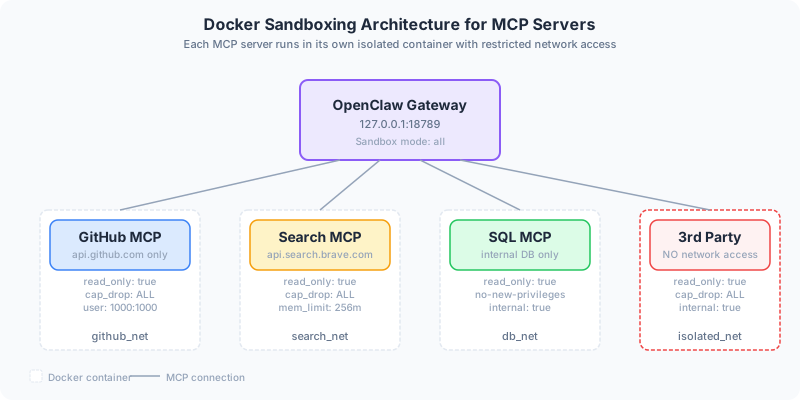
Network isolation: one network per MCP server
Most hardening guides stop at the container level. But MCP servers have a specific problem: each one connects to a different external service, so they each need their own network policy.
Your GitHub MCP server should only reach api.github.com. It has no business talking to your Gmail or your database.
Per-server network segmentation
Instead of putting all MCP servers on one shared network, create isolated networks for each:
services:
  mcp-github:
    image: ghcr.io/modelcontextprotocol/server-github:latest
    networks:
      - github_net
    environment:
      - GITHUB_TOKEN_FILE=/run/secrets/github_token
    secrets:
      - github_token

  mcp-brave-search:
    image: ghcr.io/modelcontextprotocol/server-brave-search:latest
    networks:
      - search_net
    environment:
      - BRAVE_API_KEY_FILE=/run/secrets/brave_key
    secrets:
      - brave_key

networks:
  github_net:
    driver: bridge
  search_net:
    driver: bridge

secrets:
  github_token:
    file: ./secrets/github_token.txt
  brave_key:
    file: ./secrets/brave_api_key.txt
Each MCP server gets its own network and its own secrets. No cross-talk. If the Brave Search server gets compromised, it can't reach your GitHub token or your database.
Egress proxy for fine-grained control
If you want even tighter control, route all outbound MCP traffic through a filtering proxy. The community project navanpreet/openclaw-docker-sandbox shows how this works: agent containers sit on an internal-only network, and internet access goes through a proxy that enforces domain allowlists.
Use Docker secrets (shown above) instead of environment variables for API keys. Env vars show up in
docker inspectoutput and process listings. Secrets are mounted as files and only readable inside the container. It's a small change that closes a real leak.
Beyond Docker: more layers worth adding
Docker sandboxing is the floor, not the ceiling. A few more things are worth your time.
Rootless containers with Podman
Docker's daemon runs as root. If an attacker escapes a Docker container, they land as root on your host. Podman runs without a root daemon, so a container escape lands as an unprivileged user (UID 1000) -- the blast radius shrinks to that user's home directory. The trade-off is more setup complexity, but for production deployments where MCP servers touch sensitive data, I think it's worth it.
Skill scanning with Clawdex
Before installing any skill that wraps an MCP server, run it through Clawdex, Koi Security's scanner that checks against their database of known malicious packages. It can also retroactively scan skills you've already installed, so run it even if you've been using ClawHub for a while.
Human-in-the-loop for destructive MCP actions
MCP servers that delete files, send emails, or write to databases should require a human to approve the action before it executes. OpenClaw supports confirmation prompts for destructive actions, and there are dedicated human-in-the-loop MCP server implementations in the ecosystem.
Runtime monitoring
The community openclaw-security-monitor watches for ClawHavoc patterns, AMOS stealer activity, CVE-2026-25253 exploitation attempts, and memory poisoning in real time. Worth running if you have any public-facing OpenClaw instances.
Hardening checklist
The minimum before you run OpenClaw with MCP servers in production:
- Update to v2026.2.17+ (patches both CVEs)
- Enable sandbox mode:
openclaw config set sandbox.mode all - Harden containers:
read_only,cap_drop: ALL,no-new-privileges, non-root user - Bind gateway to localhost:
127.0.0.1:18789, reverse proxy in front - Give each MCP server its own Docker network
- Use Docker secrets for API keys (not env vars)
- Scan skills with Clawdex before installing
- Run runtime monitoring for indicators of compromise
- Set resource limits on every container (CPU, memory, PIDs)
None of this is set-and-forget. New MCP servers ship weekly, new CVEs get disclosed monthly, and your attack surface grows with every integration you add. Revisit this list every time you add a new MCP server to your openclaw.json.
If you've done something different with your own hardening setup, or if there's an MCP server that keeps you up at night, I'd genuinely like to hear about it.
For a deeper look at how tool descriptions get weaponized in the first place, see our MCP tool poisoning guide. And our OpenClaw MCP security overview covers 5 real attacks targeting OpenClaw's MCP layer with specific fixes for each.
Docker vs. Podman for MCP server sandboxing
| Criteria | Docker | Podman |
|---|---|---|
| Root daemon required | Yes (runs as root) | No (daemonless) |
| Container escape blast radius | Root access on host | Unprivileged user only |
| OpenClaw native support | Yes (built-in) | Requires manual config |
| Setup complexity | Low | Medium-High |
| Docker Compose compatibility | Full | Via podman-compose |
| Best for | Development, most deployments | Production with sensitive data |
Frequently asked questions
What is Docker sandboxing for MCP servers?
Docker sandboxing for MCP servers means running each Model Context Protocol server inside its own isolated Docker container with restricted permissions. This includes read-only filesystems, dropped Linux capabilities, non-root users, and network isolation. If an MCP server gets compromised, the sandbox prevents the attacker from accessing your host machine, other services, or sensitive files.
How do I enable sandbox mode in OpenClaw?
Run openclaw config set sandbox.mode all from the CLI, or add "sandbox": true to your agents defaults in the OpenClaw config file. After enabling, verify it's working by running openclaw sandbox status and confirming that tool executions show container IDs in logs, not host PIDs.
What is CVE-2026-24763?
CVE-2026-24763 (GHSA-mc68-q9jw-2h3v) is a Docker sandbox bypass vulnerability that affected all OpenClaw versions before 2026.1.29. OpenClaw failed to sanitize the PATH environment variable when constructing shell commands inside its Docker sandbox, allowing authenticated users to inject arbitrary commands through shell metacharacters. The fix was released in v2026.1.29.
Should I use Docker or Podman for MCP server sandboxing?
Both work, but they have different security profiles. Docker's daemon runs as root, so a container escape gives the attacker root access to your host. Podman runs daemonless without root, so a container escape lands as an unprivileged user. Podman is more secure for production deployments but requires more setup complexity. Docker is simpler and has native OpenClaw support.